What You Should Own at the End of an App Project
Ownership gaps are one of the most common and avoidable problems in mobile development. Here's what accounts, code, and assets you need to control, and when you need to have them.

This is the seventh post in a series adapted from my guide, Build It Right: An Insider's Guide to Mobile App Development for Non-Developers. Each entry takes one slice of the guide and turns it into something you can read in ten minutes.
One of the most common and avoidable problems in mobile development is a client discovering, after the relationship with a developer ends, that they don't actually own their own app. Not because anything fraudulent happened, but because nobody discussed ownership at the start, and the accounts, code, and credentials ended up in the developer's name by default.
Getting this right costs nothing at the beginning of a project. Fixing it afterward can be expensive, slow, and occasionally impossible. This post covers what you should own, why it matters, and when you need to have it.
The accounts you need to own
Several external accounts are created or used during the course of building a mobile app. Each one should be in your name, registered to your email address, and under your control before development begins. Not at the end. Before it starts.
Apple Developer account
This is the account that allows apps to be submitted to the App Store. It costs $99 per year and is tied to either an individual or an organization.
Use the organization (business) account, not the individual account. The cost is the same, but the organization account lets you invite team members and assign them specific roles without sharing your credentials or giving up control of the account. Your developer gets the access they need; you remain the account owner.
This matters for two reasons that go beyond access. First, any revenue generated by in-app purchases or subscriptions flows to the account owner. If your app is submitted under your developer's account, your revenue goes to them. Apple pays out to whoever owns the account. Second, the account controls what gets submitted to the store and what doesn't. You need that control to remain with you regardless of what happens with the developer relationship.
Create the Apple Developer account yourself at developer.apple.com before a single line of code is written. Add your developer as a team member with the appropriate role. The app should be registered and submitted under your account from the beginning, not transferred later.
Google Play Developer account
The Android equivalent. A $25 one-time fee, registered to you. Same principle: create it yourself, add the developer as a user with appropriate permissions.
Third-party service accounts
Most apps depend on external services: Firebase or AWS for the backend, RevenueCat for subscription management, Mixpanel or Amplitude for analytics, Stripe for payments, and so on. Each has its own account, its own billing, and its own data.
Every one of these accounts should be registered to you from the start. Your developer gets added with appropriate access, not the other way around. If you let the developer create these accounts under their own credentials, you may find yourself locked out of your own app's data if the relationship ends.
Make a list of every external service the app will use. Confirm you have owner-level access to each one before development begins.
The code repository
The source code is the primary investment you're making in this project. It needs to live in a repository that you own and control, with full administrative rights.
This is not the same as being granted access to a developer's repository. Access can be revoked. Permissions can be changed. A developer who controls the repository controls the codebase, even if they've nominally given you visibility into it.
The right setup: you create a repository under your own GitHub account or organization. Your developer is added as a collaborator. As work is completed and paid for, the code gets pushed to your repository. If the relationship ever needs to end, you remove the developer's access. Your code stays exactly where it has always been, fully under your control, with the complete commit history intact.
A developer who resists this setup is a significant red flag. The code you're paying for belongs to you. The repository it lives in should belong to you as well.
Own it as you pay for it
A common misconception is that ownership transfer is something that happens at the end of a project. It shouldn't be. As each piece of work is completed and paid for, it should already be in your possession: in your repository, in your accounts, under your control.
This matters because things happen. Developers become ill, unavailable, or simply unresponsive. Disputes arise. Relationships end before a project reaches its formal conclusion. If you've been paying for work that lives entirely in someone else's accounts and repositories, you may find yourself unable to access what you've already paid for.
Get the code into your repository from the start. Get access to your accounts from the start. By the time a project is complete, there should be very little to hand over because you've already been receiving it as it was built.
A final review at project completion is still valuable: confirm nothing has been missed, verify all credentials are current, make sure documentation is in order. But that final check should be confirmation of what you already have, not the first time you're asking for it.
The code itself
Ownership of the source code should be addressed explicitly in your contract. In many jurisdictions the default is that the person who wrote the code owns it, not the person who paid for it, unless a written agreement specifies otherwise. Make sure your contract includes a work-for-hire or IP assignment clause that transfers all ownership to you upon payment for each milestone.
If a developer raises a concern about this, ask specifically what they object to. A legitimate concern is pre-existing utility code or personal frameworks they use across projects. A reasonable solution is to carve that out separately: pre-existing code is licensed to your project, newly written code is yours outright. This is a standard arrangement and worth accepting. What isn't acceptable is a developer retaining ownership of code written specifically for your product.
What to confirm at delivery
At project completion, run a checklist against what you should already have:
- Source code in your repository, with full commit history
- All design files in their original editable format (Figma, Sketch, or similar), not just exported images
- Credentials and API keys for all third-party services, stored somewhere secure that you control
- Documentation sufficient for a new developer to understand the project structure
- Confirmation that all App Store submissions were made from your Apple Developer account
If any of these aren't already in your possession, resolve it before releasing final payment.
If you're already in a project and haven't done this
Raise it now. A professional developer handles this without friction. Most ownership gaps exist because nobody discussed it upfront, not because anyone was trying to take advantage.
For Apple, register the app under your own Apple Developer account using your own bundle ID. The developer works within your account going forward.
For third-party services, if the product isn't live yet, set up new accounts under your name, give the developer the access they need, and use your own API keys in the project from that point on.
For the code repository, ask your developer to push the full codebase and commit history to a repository you own. This is a standard git operation and takes minutes. Once it's there, work continues in your repository.
An awkward ten-minute conversation now is far better than an expensive problem later.
This post is adapted from Build It Right: An Insider's Guide to Mobile App Development for Non-Developers. If you'd rather just talk it through, reach me at scott@appswage.com.
Hourly or Fixed Bid? How to Structure Your App Development Engagement
Hourly and fixed-bid pricing reward different things and suit different projects. Here's how to tell which one is right for yours.

This is the sixth post in a series adapted from my guide, Build It Right: An Insider's Guide to Mobile App Development for Non-Developers. Each entry takes one slice of the guide and turns it into something you can read in ten minutes.
Once you've found a developer you want to work with, the next decision is how to structure the engagement. Specifically: are you paying by the hour, or paying a fixed price for a defined scope of work?
Most clients assume fixed bid is safer because the number is agreed in advance. In practice, for most projects, hourly is the healthier contract type. It aligns incentives and keeps the conversation honest about what's actually being built.
That's not always the case. Both models make sense in the right situations, and a well-structured engagement often combines them. This post explains what each model actually means in practice and how to think about which one fits yours.
How hourly billing works
You pay for the developer's time at an agreed rate. The total cost depends on how long the work takes.
The appeal is straightforward: you're not committing to a number before you fully understand what you're building. If the scope turns out to be simpler than expected, you pay less. If you want to change direction mid-project, you can without a contractual renegotiation. And because both parties are working from the same live picture of hours spent, the conversation about what's being built tends to stay honest.
This is why hourly suits most projects. Development, especially in early stages, involves discovery. You learn things as you go: about what users actually need, about technical constraints you didn't anticipate, about features that don't work the way you imagined. Hourly billing accommodates that reality rather than fighting it.
The discipline hourly requires is attention. Someone needs to be tracking the hours, reviewing them regularly, and raising a flag when the project is running ahead of the estimate. That responsibility is shared between you and the developer. A good hourly developer gives you detailed time logs and flags concerns before they become billing surprises. Your job is to read them and ask questions.
How fixed-bid billing works
You agree on a defined scope and a single price for that scope. The developer delivers what was agreed; you pay what was agreed.
In practice, fixed-bid projects are always milestone-based. That's simply how you structure the work and how the developer gets paid along the way: a portion at the start, further payments tied to defined deliverables (designs approved, initial build complete, testing done), and a final payment at delivery. The milestones also give you natural checkpoints to review the work before the next phase begins.
Fixed bid works well when the scope is genuinely clear before work begins. That means detailed designs, a specific feature list, and agreed acceptance criteria. When those conditions exist, a fixed price gives you cost certainty and gives the developer a clear target. The model rewards efficiency: a developer who finishes under their estimated hours earns a better effective rate, and you pay no more than agreed.
The risk is that fixed bid only works cleanly on what was defined. Scope changes mid-project mean renegotiation, which is fine when both parties expect it but creates friction when the client assumed the original price covered everything. For projects where the direction is likely to evolve, that friction adds up.
Hybrid approach worth considering
For many engagements, the right answer isn't one model or the other but a deliberate combination of both.
Concrete, well-defined deliverables work well on fixed bid: a specific set of screens, a defined feature, a particular integration. Both parties know exactly what's being built and can agree on a price before the work begins.
Everything else works better hourly: iterative work where the outcome isn't fully defined yet, maintenance and bug fixes, onsulting and review, and any work that's inherently ad hoc. These activities don't have a clean scope to price against, and trying to force them into a fixed bid produces either inflated estimates (to cover the uncertainty) or low-quality work (cut to hit the price).
A thoughtfully structured engagement often looks like this in practice: fixed bid for the initial defined build, hourly for everything before it (discovery, design iteration, scoping) and everything after it (maintenance, feature additions, support). The fixed bid covers the part where you both know what you're building. The hourly covers the parts where you're still figuring it out, or where the work is ongoing and variable by nature.
How to choose
A few questions that point toward an answer.
How well defined is the scope? Detailed designs, a specific feature list, and agreed acceptance criteria point toward fixed bid. Anything more exploratory points toward hourly.
Is this a one-time build or an ongoing relationship? A standalone project with a clear endpoint suits fixed bid. An ongoing engagement with evolving priorities suits hourly, possibly with fixed-bid blocks for specific deliverables as they're defined.
How much do you trust the developer's estimate? Fixed bid shifts the estimation risk onto the developer. They price in a buffer to cover that risk, which is appropriate. Hourly makes the estimate a working target rather than a hard ceiling, which requires more discipline on both sides but tends to produce a more honest number.
What happens after launch? If you expect to need the developer for maintenance, improvements, or support, establish what that looks like before you sign the initial contract. Most post-launch work is poorly suited to fixed bid and works better on retainer or hourly.
The conversation to have before you sign anything
Whatever model you agree on, ask the developer to walk you through what happens when something changes. What's the process for adding a feature? What if a deliverable needs more revision than expected? What's the post-launch support arrangement?
A developer who has clear, practiced answers to these questions has managed projects before and thought about how to handle the inevitable complications fairly. A developer who hasn't considered it is going to be figuring it out under pressure at the worst possible moment.
The next post in the series gets into what you should own at the end of a project: accounts, code, and the assets most clients don't know to ask for until they need them.
This post is adapted from Build It Right: An Insider's Guide to Mobile App Development for Non-Developers. If you'd rather just talk it through, reach me at scott@appswage.com.
How to Evaluate a Freelance Mobile Developer
Hiring is the highest-leverage decision in your project, and most clients make it on the wrong signals. Here's what to weight, what to discount, and what to listen for in the conversation.

This is the fifth post in a series adapted from my guide, Build It Right: An Insider's Guide to Mobile App Development for Non-Developers. Each entry takes one slice of the guide and turns it into something you can read in ten minutes.
The hiring decision is the single highest-leverage choice in your project. A strong developer makes every other decision easier. A weak one makes every other decision harder, more expensive, or both. By the time you can tell which one you've hired, you've usually paid for several weeks of work.
This post is about how to make that decision before you've signed a contract, using the only things you have to go on: a profile and a conversation.
Reading the profile
Most freelance platforms show you roughly the same set of signals: a star rating, a job success score, a list of past projects, reviews from past clients, an hourly rate, and the developer's self-written bio. Most clients look at the wrong ones.
The signals worth weight
Volume of completed work. A developer with hundreds of completed jobs and thousands of hours billed has shipped real things to real clients. That doesn't guarantee quality, but it does mean they've operated long enough to develop judgment about how projects actually go.
Long-term client relationships. Look for repeat clients, multi-month engagements, or extended single contracts. These are harder to fake than a five-star rating. If a developer has worked with the same client across three projects spanning two years, that client kept choosing them. That's a stronger signal than ten short, glowing reviews from one-off engagements.
Specialization. A profile that says "iOS developer with 15 years of native experience" tells you something. A profile that lists every technology the developer has ever touched (iOS, Android, React Native, Flutter, Vue, Django, Rails, AWS, GCP, and so on) tells you almost nothing. For mobile app projects, depth wins over breadth almost every time.
The specifics in their reviews. Skim past the praise and look at what clients actually wrote. "Great work, recommended!" tells you nothing. "Jumped immediately into a 2.5 year development project and was able to work very efficiently amongst our development team, despite the very unique use cases of our products/platforms." tells you the developer communicates well, has shipped apps before, and adapts quickly. Specifics are what separates real signal from generic enthusiasm.
The signals to discount
Star ratings on their own. A perfect five-star average is necessary but not sufficient. Most working freelancers have one, because clients rarely leave less than five stars unless something went badly wrong. The interesting question is what the five stars are for, which is the specifics question above.
Self-written bios. Every bio is a sales pitch. Bios are useful for two things only: noticing what the developer chose to emphasize (specialization vs. breadth, past clients vs. past technologies, business outcomes vs. technical buzzwords), and confirming they can write coherently. Beyond that, take them with the same grain of salt you'd take any marketing copy.
Hourly rate, in isolation. Rate alone doesn't tell you about quality. A low rate may mean inexperienced, undervalued, or working from a country with a lower cost of living. A high rate may mean experienced, in demand, or strategically priced. Rate tells you what an engagement will cost. It doesn't tell you what it's worth.
The conversation
Most freelance engagements include some kind of conversation before the contract: a call, a chat, an exchange of messages. This is the single highest-information part of the hiring process, and most clients waste it.
The mistake is treating the conversation as a sales pitch, where the developer talks and you listen. The conversation should go the other way. The developer should be asking you most of the questions. You should be listening for what they ask, how they ask it, and how they respond when you push back.
What you're listening for
Do they probe the project, or accept it as given? A strong developer asks about your users, your budget, your timeline, what success looks like, what you've already built or rejected, what's negotiable. A weak one accepts the brief as written and starts quoting hours. The first kind catches the problems with your plan before you waste money on them. The second builds whatever you said, even when whatever you said was wrong.
Are they candid about what they don't know? Mobile development is broad enough that nobody knows all of it. A developer who tells you they'd need to look something up, or who admits they haven't shipped that particular technology before but explains how they'd come up to speed, is being honest with you. A developer who has confident answers to every question, no matter how specific, is either superhuman or telling you what you want to hear.
Do they push back? If you propose something that won't work, or won't work well, the right developer says so. They suggest alternatives. They explain trade-offs. A developer who agrees with everything you say is not going to be useful when the project hits a hard decision point, which every project does.
How do they talk about money? A serious developer engages with your budget. They tell you what trade-offs different budgets imply, what they can deliver at different price points, where they think you'd be wasting money, and what they'd cut first if asked. A developer who quotes a number and stops is not managing your investment. They're billing for their time.
Do they answer your actual question? Pay attention to whether their answers connect to what you asked. A common failure mode is the developer who, when asked about a specific concern, answers a different question they wished you'd asked, the one they have a prepared answer for. This is a communication problem, and as the first post in this series pointed out, communication problems are the most common reason projects fail.
A useful trick
Near the end of the conversation, ask the developer where they think your project is most likely to go wrong. A good one has been thinking about this through the whole conversation and gives you a real answer. They'll name a specific technical risk, or a specific scope question they're unsure about, or a specific concern about your timeline. A weak one says something generic about "scope creep" or "miscommunication."
The answer to that one question is often more informative than everything else combined.
Putting it together
You're not looking for a perfect candidate. You're looking for someone whose strengths fit your project, who is honest about where they're weaker, who communicates well, and whose judgment you trust.
The biggest mistake non-technical clients make in hiring is overweighting credentials and underweighting communication. A developer who can describe their last project in compelling detail but who answers your direct questions with deflections is a worse hire than one with a shorter resume who engages seriously with your situation.
The opposite mistake also exists: hiring someone who is delightful to talk to but who can't actually point to shipped work. Both are real failure modes. The goal is to find someone who has both, and then to trust the conversation more than the resume when they conflict.
The next post in the series gets into how to structure the engagement once you've chosen someone: hourly vs. fixed-bid pricing, what each model rewards, what each one risks, and how to choose between them.
This post is adapted from Build It Right: An Insider's Guide to Mobile App Development for Non-Developers. If you'd rather just talk it through, reach me at scott@appswage.com.
Realistic Timelines: Why Your App Will Take Longer Than You've Been Quoted
Most clients are quoted timelines that are missing half the work. Here's what a real app project actually involves, and how to recognize a timeline that's been thought through.
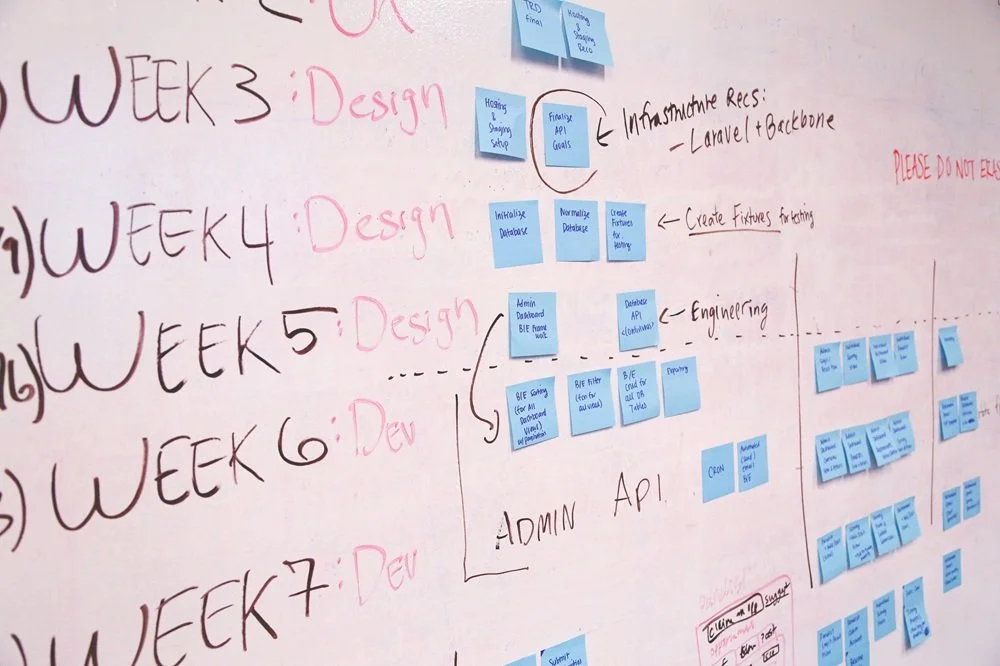
This is the fourth post in a series adapted from my guide, Build It Right: An Insider's Guide to Mobile App Development for Non-Developers. Each entry takes one slice of the guide and turns it into something you can read in ten minutes.
Almost every client comes into a project with a timeline in their head, and almost every one of those timelines is wrong. Not because clients are unreasonable, but because they're being quoted by people who are leaving out half the work.
This post is about what an app project actually involves, why the estimates you'll be given are usually optimistic, and how to recognize a timeline that's been thought through.
The phases nobody mentions
Most timeline conversations focus on the part where the developer writes code. That's one phase out of five, and it's usually not even the longest one.
Planning and design (2 to 4 weeks)
Before any code gets written, someone has to make decisions about what the app does, how the screens fit together, and what they look like. Done seriously, that means wireframes, then visual design mockups, then your review and feedback, then revisions.
If you skip or rush this phase, the cost reappears later as feature changes mid-development, which are far more expensive than design changes are. I won't skip this phase even when clients ask me to. Code written without a clear design is code that gets thrown away.
Initial development (4 to 12 weeks for an MVP)
The actual coding. The range here is huge because it depends on what the app does. A simple content app or utility takes 4 to 6 weeks. An app with user accounts, a backend, and several connected features takes 8 to 12 weeks. An app that does anything genuinely complex (real-time features, AR or VR, sophisticated AI integration, deep system integration) takes longer.
Testing and refinement (2 to 3 weeks)
Even setting aside dedicated QA, the developer has to test the app, you have to test the app, and bugs have to be fixed. This phase always takes longer than expected, because finding bugs and fixing them are different problems, and fixing one sometimes uncovers others.
App Store review (1 to 7 days, sometimes longer)
This is the phase clients forget about most often. Apple and Google both review every app before it appears in the store. The first submission is frequently rejected, often for reasons that aren't obvious until you've been through it. Common rejection reasons include incomplete metadata, missing privacy policy disclosures, in-app purchase implementation problems, and ambiguity about what the app does.
I plan for at least one rejection and resubmission cycle. Clients who haven't been through the process before are usually surprised by it.
Post-launch fixes (ongoing)
The first two weeks after launch will produce bugs and edge cases nobody saw during testing, because real users use apps differently than test users do. A serious developer plans for this. A casual one disappears the day the app goes live.
Add it up and you're at roughly 9 to 22 weeks for an MVP-grade app, with most projects landing somewhere in the middle.
Why estimates go wrong
Four things, mostly.
Optimism bias
Developers, myself included, underestimate how long things take. We remember the projects that went smoothly and forget the ones that didn't. The fix is experience, and even with experience the bias never fully goes away.
Undefined scope
The most common cause of timeline blowouts is that the scope was never clearly defined at the start. Every "wait, can we also add..." conversation extends the timeline, and most projects accumulate dozens of those. This is also why post 1 in this series spent so much time on getting the vision clear before development begins.
Your own time
Your timeline includes the time you take to review and approve work, give feedback, make decisions, and answer questions. If you're not available for a week, the project is paused for a week. Most estimates assume you'll respond within a day or two. That's often unrealistic, and the project pays for it.
External dependencies
APIs you're integrating with, third-party services, designers and testers other than the developer, your own marketing team. Anything outside the developer's direct control adds variance, and clients tend to underestimate how much of a project is outside the developer's direct control.
What a realistic timeline looks like
A timeline you can trust has a few characteristics.
It includes design and review phases, not just development. If a developer quotes you 6 weeks of "build" with nothing else, ask what that 6 weeks includes.
It identifies milestones with deliverables you can review. "Mid-project demo of the login and onboarding flows" is a milestone. "Halfway done" is not.
It includes buffer for App Store review and at least one rejection cycle. A developer who claims they've never had an app rejected has either not shipped many apps or is rounding the truth.
It accounts for your time. A good developer asks how much availability you have for review and feedback, and adjusts the timeline accordingly.
It distinguishes hard deadlines from estimates. "We can ship by mid-March" is different from "I think we can ship by mid-March, with the following risks." A developer who can't articulate the difference hasn't thought about it.
Red flags
A few things to watch for when someone gives you a timeline.
"I can have this done in two weeks." For anything other than a genuinely small project, this is either a misunderstanding of the scope or a developer trying to win the bid. You'll find out which one when you're three weeks in and not done.
A timeline with no design phase. Either design is happening somewhere you're not seeing, or it isn't happening at all. Both are problems.
A timeline that doesn't mention App Store review. The developer has either not actually shipped many apps or hasn't planned for review at all.
Estimates that don't change as the scope changes. If you ask for a new feature mid-project and the developer keeps the original timeline, they're either not telling you the truth or they were padding the estimate from the start.
What to do with this
You can't make a timeline more accurate by asking for it to be shorter.
What you can do is make sure the timeline you're being quoted reflects all the work, not just the visible parts. If a developer's quote is dramatically faster than what I've described above, that's not necessarily wrong. They may be more efficient, the scope may be smaller than I'm assuming, or they may have done similar projects before and know shortcuts. But ask. A serious developer will be able to walk you through where the time is going. A less serious one will give you a number and move on.
And once a timeline is set, treat slippage as a signal, not a normal part of the process. Some slip is inevitable. Repeated slip is a sign that the original estimate was wrong, the scope is changing, or something else is going sideways. None of those resolve themselves by waiting another week.
The next post in the series gets into the question that comes before the timeline question: how to evaluate a freelancer in the first place. What their profile actually tells you, what to listen for in the interview, and how to tell the difference between someone who can do the work and someone who can describe it.
This post is adapted from Build It Right: An Insider's Guide to Mobile App Development for Non-Developers. If you'd rather just talk it through, reach me at scott@appswage.com.
Local LLM Showdown: Can Qwen and Gemma Write Quality SwiftUI Code?
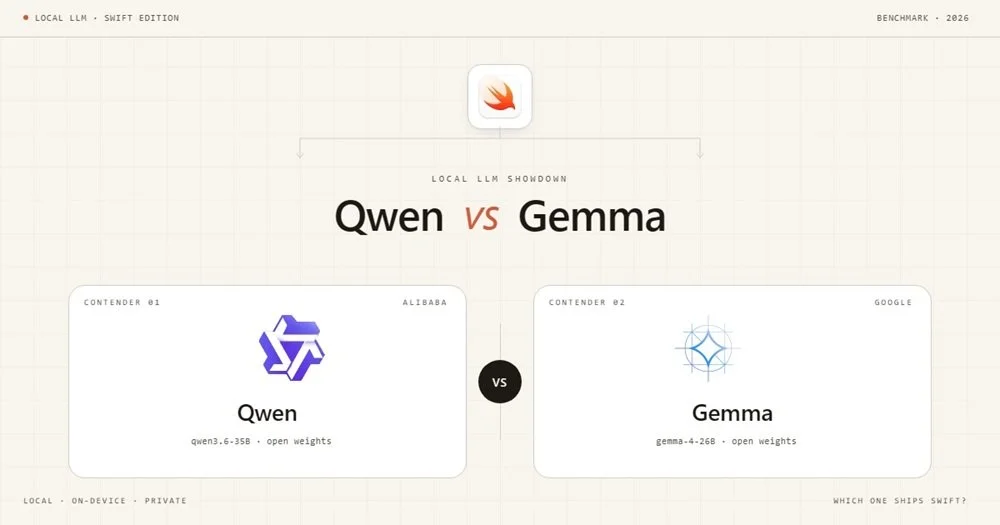
I tested two local LLMs - Google's Gemma 4-26B-A4B and Alibaba's Qwen 3.6-35B-A3B - against five SwiftUI prompts ranging from basic UI to Swift actors, structured concurrency, and SwiftData. No cloud APIs, no RAG, no web search. Just the models, LM Studio, and Xcode telling me if the code actually compiles.
I wanted to answer a simple question: are local LLMs good enough to generate real iOS app code? Sooner rather than later, the era of cheap frontier LLMs for coding is going to come to a close. Will there be alternatives, and perhaps will those alternatives be LLMs that we can run locally on our own hardware and network? These tests start simple but ramp up to code that uses modern Swift concurrency, SwiftData, and the latest SwiftUI APIs. How do the latest local LLMs running on moderate hardware fare?
To find out, I designed a five-test benchmark suite that progresses from trivial UI work to complex architectural challenges and ran it against two models: Google's Gemma 4-26B-A4B and Alibaba's Qwen 3.6-35B-A3B, both running locally through LM Studio. No cloud APIs, no safety net. Just a GPU, a prompt, and Xcode waiting to tell me if the code actually compiles.
Here's what I found (Link to detailed report at bottom).
The Test Suite
I designed five tests to stress-test increasingly modern Swift/SwiftUI capabilities:
- Multi-Tab Color App - Basic SwiftUI structure. Can the model produce a working TabView?
- Drawing Canvas - Gesture handling with Canvas API. Does it understand DragGesture and state management?
- Async/Await Networking - Swift concurrency with URLSession, @MainActor, error handling, and retry logic.
- Actor + Structured Concurrency - Actor isolation, withTaskGroup, progressive UI updates, and cache deduplication.
- SwiftData + @Observable - iOS 17 APIs: @Model, @Query, SwiftData persistence, and the @Observable macro.
Each prompt was given with a lightweight system prompt (see Setup Disclosure below) and no additional coaching, examples, or chain-of-thought scaffolding. The development workflow used Xcode's MCP integration to LM Studio, which does not support web search or RAG. Everything came from the model itself.
How I Scored
Before diving into results, the scoring framework matters. I evaluated two dimensions per test, each scored out of 5:
- Performance - How many iterations to reach a working solution, and how long each took.
- Code Quality - Correctness against the spec, API usage, architecture, and maintainability.
A few principles I committed to up front:
- UI embellishment beyond the spec is neutral. If a model adds a nice loading animation I didn't ask for, it doesn't earn extra credit - but it doesn't lose points either, unless it introduces complexity.
- Anticipating unstated requirements is also neutral. Models are scored on the problem as stated.
- Functional bugs against the spec are penalized regardless of how minor the fix.
- Dead code and duplicate implementations are penalized. They create real maintenance cost for the developer inheriting the output.
Test 1 - Multi-Tab Color App
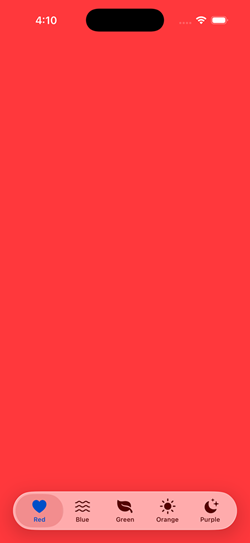
The ask: Five tabs, five full-screen colors, SF Symbol icons, labels.
Qwen nailed it in a single pass in about 40 seconds. Clean, straightforward, no issues. Wrote each tab out explicitly with separate Color, Image, and Text declarations.
Gemma also solved it in one pass in about 26 seconds - faster - but with one incorrect SF Symbol name (water.wave instead of water.waves). A trivial fix, but a fix nonetheless.
The interesting code quality difference: Gemma created a TabConfiguration struct and drove the UI with ForEach, which is the architecturally correct pattern for this specific prompt where all tabs share uniform data. It also used Label() for tab items - the modern SwiftUI idiom - while Qwen used the older separate Image + Text pattern.
Worth noting: in a real production app, tabs call distinct views with different modifiers and navigation stacks. Qwen's explicit style is actually closer to how that code looks in practice. But the prompt asked for uniform color tabs, and Gemma recognized that uniformity and applied the right pattern for it.
Verdict: Tie. Both solved it cleanly in one pass. Gemma had the better architecture for the specific ask; Qwen had the cleaner output with no errors.
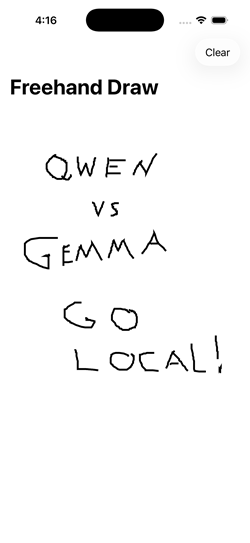
Test 2 - Drawing Canvas
The ask: Freehand drawing with finger, new line on lift/re-touch, Clear button.
Qwen delivered a working solution on the first attempt in about 50 seconds. Clean, readable, functional.
Gemma took three iterations and nearly three minutes of total generation time. The first iteration didn't even write to the file. The third iteration worked but left a complete duplicate implementation and an unused helper method in the file - two full view structs where only one was active.
On code quality, both had specific issues. Qwen used DragGesture() without minimumDistance: 0, meaning very short strokes and single-tap dots won't register - a real functional bug for a drawing app. Gemma got the gesture right but shipped dead code that would confuse any developer reading the file.
Verdict: Tie on quality, Qwen wins on performance. Different failure modes: Qwen has a subtle functional gap, Gemma has a code hygiene problem. Neither is clean enough to clearly win on quality, but Qwen's single-pass delivery is a clear performance advantage.
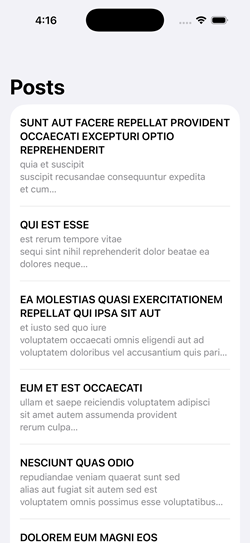
Test 3 - Async/Await Networking
The ask: Fetch posts from a JSON API, display in a List, show loading state, handle errors with retry, use @MainActor correctly.
Both models needed three iterations, though for different reasons. Qwen's third pass was an intentional migration to @Observable rather than a bug fix - so it effectively solved the original prompt in two. Gemma's second iteration described the fixes needed but didn't actually implement them in code, wasting a round trip.
The code quality gap was clear. Qwen's solution had two functional bugs against the spec:
- The
isLoadingcheck on retry replaces the existing post list with a spinner rather than keeping data visible during refresh. - The
catchblock doesn't resetisLoadingto false, so a decode error leaves the spinner up permanently.
Gemma handled both correctly. Its loading check - isLoading && posts.isEmpty - keeps previously loaded data visible during a retry, which is the right UX pattern when the prompt explicitly asks for retry functionality.
Verdict: Gemma wins. Tied on iteration count, but Gemma's code is functionally correct against the retry requirements where Qwen's is not.
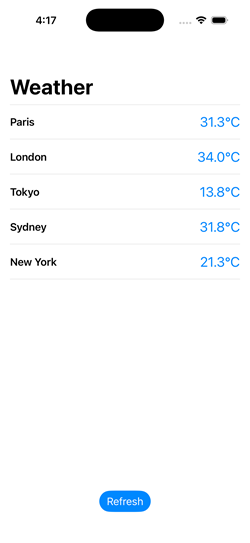
Test 4 - Actor + Structured Concurrency
The ask: Simulated concurrent weather fetching for 5 cities, actor-based cache with duplicate prevention, progressive display as results arrive, refresh button.
This was the widest gap of the five tests.
Gemma solved every requirement correctly on the first attempt in about 75 seconds. The actor tracked in-flight tasks by city to prevent duplicates. Results streamed into the UI progressively. @MainActor was placed correctly on the methods that update state.
Qwen needed four iterations and still didn't fully resolve the requirements. The specific failures:
- No duplicate fetch prevention. The actor checked the cache but didn't track in-flight tasks. Two concurrent requests for the same city would both execute.
- Cache didn't persist. A new WeatherCache was instantiated inside
fetchWeather()on every call and immediately cleared - it never actually cached anything across invocations. - @MainActor missing. An inline comment claimed
@Observablehandles main thread dispatch automatically. It doesn't. This is confidently wrong reasoning. - Progressive display broken. The
isLoadingflag wasn't set to false until the entire TaskGroup completed, blocking the list from updating as individual results arrived. Qwen couldn't diagnose this across four attempts - it refactored around the issue rather than identifying the root cause. I eventually identified and fixed the bug manually.
Verdict: Gemma wins decisively. Single iteration, all requirements met. Qwen failed three of four stated requirements and couldn't self-diagnose across four iterations.
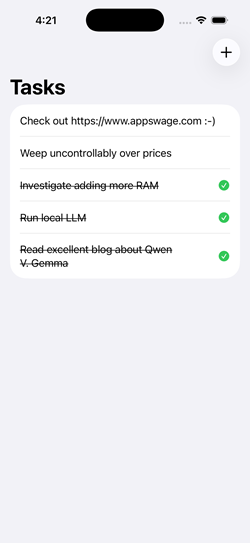
Test 5 - SwiftData + @Observable
The ask: Task manager app with SwiftData persistence, @Model, @Query sorted by date, @Observable (not ObservableObject), swipe-to-delete, sheet for adding items, tap to complete.
Gemma solved it in one iteration with only a trivial compile error (an extra colon on an image line). The architecture was clean: no unnecessary ViewModel layer, @Query driving the list directly, and a self-contained AddItemView using @Environment for both model context and dismissal.
Qwen needed three iterations. The second produced a visually plausible app where items could be entered but didn't appear in the list - a silent data flow failure harder to diagnose than a compile error. The code had several architectural issues: an unnecessary TodoViewModel layer on top of SwiftData (which is specifically designed so you don't need one for basic CRUD), calling modelContext.insert() on an existing object during a toggle (incorrect - SwiftData tracks mutations automatically), and a sheet architecture that unnecessarily coupled AddItemView to the parent ViewModel.
Both models shared a significant gap: neither added explicit modelContext.save() calls at transaction boundaries. Both relied on SwiftData's autosave, which works during normal app lifecycle transitions but fails when the process terminates unexpectedly - in the simulator's hard stop, but also in production crashes, watchdog kills, or low-memory terminations. This isn't a simulator quirk to dismiss. It's an incomplete understanding of SwiftData's persistence contract that affects real-world reliability. I added explicit saves manually to both solutions.
Verdict: Gemma wins. Stronger SwiftData idiom awareness throughout, cleaner architecture, fewer iterations. The shared autosave gap is a training data limitation common to both model families.
The Numbers
| Test | Qwen 2.6-35B-A3B | Gemma 4-26B-A4B | ||||
|---|---|---|---|---|---|---|
| Iters | Perf | Quality | Iters | Perf | Quality | |
| 1 - Multi-Tab Color | 1 | 5/5 | 4/5 | 1 | 5/5 | 4/5 |
| 2 - Drawing Canvas | 1 | 5/5 | 4/5 | 3 | 2/5 | 4/5 |
| 3 - Async Networking | 3 | 3/5 | 4/5 | 3 | 3/5 | 5/5 |
| 4 - Actor + Concurrency | 4 | 1/5 | 2/5 | 1 | 5/5 | 5/5 |
| 5 - SwiftData + @Observable | 3 | 2/5 | 3/5 | 1 | 4/5 | 4/5 |
| Totals | 16/25 | 17/25 | 19/25 | 22/25 | ||
What I Learned
Gemma excels where it matters most. The two hardest tests - actor-based concurrency and SwiftData - are the ones most representative of production iOS development with modern APIs. Gemma handled both with stronger architectural instincts and fewer iterations.
Qwen is reliable for straightforward tasks. For well-defined prompts with established API patterns, Qwen delivered clean first-pass solutions. It's a solid choice when the code doesn't push into iOS 17+ territory.
Both models have a SwiftData blind spot. The autosave assumption and the missing ModelContainer injection appeared in both models identically. If you're using any local LLM for SwiftData work, treat explicit saves as a mandatory manual addition.
Speed compounds. Gemma was consistently faster in both prompt evaluation and token generation. For iterative workflows, that advantage multiplies - Gemma's single-iteration Test 4 result was faster than any single Qwen iteration on the same test.
Diagnostic ability is a real differentiator. Both models occasionally described fixes without implementing them. More critically, Qwen showed a pattern of refactoring around problems rather than identifying root causes - particularly visible in Test 4, where it couldn't isolate a straightforward state management bug across four attempts.
Watch for behavioral drift. Qwen developed a persistent tendency to create new files rather than editing in place, and this worsened across the session rather than responding to correction. If you're using local LLMs for iterative code editing, monitor for this kind of instruction-following degradation.
Frontier Models. While it's amazing how well local models can work for Swift coding, they are not nearly as preformant as cloud frontier models. However, not every situation or budget calls for that. The expected rise in costs of using those frontier models will continue to make a stronger and stronger case for local LLMs becoming part of the production development mix.
One More Thing: The Context Window Trap
During testing I hit a problem where Qwen would run for a minute or more and then stop - no errors, no output, nothing. The LM Studio server log revealed the culprit:
stop processing: n_tokens = 8191, truncated = 1The model was hitting the 8,192-token context window ceiling and being silently truncated. For code generation tasks, especially Tests 4 and 5 where the prompt plus generated code can easily exceed 6,000 tokens, an 8K context window is not enough. Bumping to 16K or 32K in LM Studio's server settings resolved it - but it requires a server restart, not just a settings change.
If you're benchmarking local models for code generation, start with at least 16K context. 32K is safer.
Setup Disclosure
Model Hosting
- CPU: AMD Ryzen 5 9600X
- GPU: AMD Radeon 9070XT (16GB VRAM)
- RAM: 32GB DDR5
- Software: LM Studio 0.4.12
- OS: Windows 11 Pro (25H2)
- Context: 32,768
- Temperature: 0.2
- KV Cache: Offloaded to memory
- Number of Experts: 8
Development Environment
- Hardware: Mac Mini M1 (8GB)
- IDE: Xcode 26
- Integration: Xcode MCP integration to LM Studio (no web search or RAG capability)
System Prompt
Both models received the same system prompt for all tests:
You are a helpful coding assistant specializing in Swift, SwiftUI, Kotlin, and JavaScript. When asked about recent updates, current APIs, latest versions, or anything that may have changed recently, always use the web search tool to find current information before answering. Keep code responses precise and accurate. Solution should be concise and the simplest required to fulfill the need.
Note: The system prompt references a web search tool, but the Xcode MCP integration does not provide web search capability. The models had no access to external information during testing. All output came from the model weights alone.
LLM Infrastructure (Not Used in This Report)
The following components are part of my local LLM setup but were not used during this benchmark:
- Synology DS220+ with Docker - hosts additional services
- Open-WebUI - provides RAG and web access capabilities
- searXNG - provides search capabilities for LLM workflows
These components extend the local LLM environment with retrieval-augmented generation and live web search, but they are not accessible currently from Xcode's built-in AI assistant.
AI in Mobile Development: What It Can and Can't Do (Yet)
AI has genuinely changed mobile development, but not the way the marketing says. Here's what it does well, where it breaks down, and what that means when you're hiring.
This is the third post in a series adapted from my guide, Build It Right: An Insider's Guide to Mobile App Development for Non-Developers. Each entry takes one slice of the guide and turns it into something you can read in ten minutes.
There's a version of mobile app development that exists right now in marketing copy and YouTube demos, and a different version that exists when you're trying to ship something users will actually pay for. The gap between the two is mostly about AI.
If you've been told that AI can build your app for you, or that you can describe an idea to a chatbot and get a finished product, you've heard the marketing version. The reality is more interesting and more useful. AI has genuinely changed mobile development. It hasn't changed it the way you may have been told.
This post is about what AI actually does well, where it breaks down, and what that means when you're hiring a developer.
What AI is genuinely good at
The honest answer: a lot of the day-to-day work of writing code.
Modern AI tools are remarkably effective at generating boilerplate (the routine, repeating bits of code that every app needs), translating between similar pieces of code, drafting tests, writing documentation, and handling the parts of programming that are mostly pattern matching against examples.
When I work on a project, AI saves me real time on tasks like setting up a new screen that follows the same structure as one I've already built, writing the data model code that handles JSON from an API, generating the dozens of small SwiftUI views that make up a feature, and producing the unit tests that verify a function does what it's supposed to. None of these tasks are intellectually interesting. All of them used to take time. Now they take less.
That's the legitimate productivity story. A senior developer using AI well is meaningfully faster than the same developer was three years ago.
Where it breaks down
The trouble starts when AI is asked to do work that requires judgment rather than pattern matching.
Architecture (how the pieces of the app fit together, where data flows, what depends on what) is judgment work. AI tools can produce a plausible-looking architecture, but plausible and correct are different things, and the difference doesn't show up until later. An app with a poor architecture works fine for the first few features and gets harder to extend with every one after that, until eventually adding a feature breaks three others and nobody can remember why.
Performance is judgment work. AI can write code that does what you asked, but doing what you asked at scale, on a battery-powered device, with limited memory, while staying responsive to user input, is a different problem. AI tools rarely think about that without being told to, and even when told, the judgments they make are often wrong in ways that aren't visible from the outside.
Security is judgment work. Data handling, authentication, payment flows, anything involving user privacy. AI tools will happily produce code that works and is also subtly insecure in ways that won't be discovered until something goes wrong.
The pattern is consistent. AI is excellent at the parts of programming that look like writing. It's much weaker at the parts that look like engineering.
The "looks done, isn't done" problem
This is the failure mode I see most often, and it's the one that catches non-technical clients hardest.
You hire someone, possibly inexpensively, who is using AI tools heavily. They produce something quickly. The screens look right. You can tap through it. It seems to work. You sign off, you launch, and then within weeks or months one of these things happens:
• The app is rejected at App Store review for reasons the developer can't quickly fix.
• Users start reporting crashes the developer can't reproduce.
• You want to add a feature and discover that adding it requires rebuilding pieces of the existing app.
• The app is slow on older devices and nobody knows why.
• Something breaks when iOS updates and there's no clear path to fixing it.
What happened, almost always, is that AI generated something that looked like an app but wasn't built like one. The visible parts are fine. The structural parts (the parts you can't see, the parts you'd have to be a developer to evaluate) were never engineered. They were generated, and then left in whatever state the AI happened to produce them.
Cleaning this up after the fact is its own kind of project. I do this work fairly often, and it's almost always more expensive than building the app properly the first time would have been.
What to look for when hiring
A developer who tells you they don't use AI at all is leaving real productivity on the table, and you're paying for it. A developer who tells you AI does most of the work is selling you the marketing version, and you'll pay for that later. The developers worth hiring are in between.
When you're evaluating someone who uses AI, the questions that matter:
• Where does AI help in your work, and where do you not use it?
• How do you verify what AI generates before you commit it to the project?
• Can you walk me through a recent decision where you chose not to use AI's output?
• What does your testing process look like for AI-generated code?
• Have you ever inherited an AI-built app? What did you find?
You're not looking for someone who can recite all the AI tools they use. You're looking for someone who treats AI as a tool with limits, has internalized those limits, and applies real judgment to what it produces.
A useful warning sign: if a developer can't tell you anywhere AI falls short, they probably haven't pushed it hard enough to find out.
The point
AI hasn't replaced the need for skilled mobile developers. It has changed what skilled mobile developers spend their time on. Less typing, more judgment. Less boilerplate, more architecture, performance, and review.
For you as a client, this means two things. First, you can reasonably expect projects to move faster than they did a few years ago, because the developer's time is being spent on the parts that matter. Second, the cost of hiring poorly has gone up, not down, because AI lets a less-skilled developer produce something that looks finished much earlier than they used to be able to. The visible quality of an early build tells you less than it once did.
The next post in the series gets into the timeline question: how long mobile projects actually take, why the estimates you'll be given are usually wrong, and how to recognize a realistic timeline when you see one.
This post is adapted from Build It Right: An Insider's Guide to Mobile App Development for Non-Developers. If you'd rather just talk it through, reach me at scott@appswage.com.
iOS, Android, or Both? The Platform Decision That Shapes Everything Else
The choice between iOS, Android, and cross-platform shapes your budget, your timeline, and the experience your users will have. Most clients answer it too quickly.

This is the second post in a series adapted from my guide, Build It Right: An Insider's Guide to Mobile App Development for Non-Developers. Each entry takes one slice of the guide and turns it into something you can read in ten minutes.
Once you have a clear vision for your app and you understand what the project actually involves, the next question you'll face is the most consequential technical decision of the whole project. Which platform are you building for? iOS, Android, or both? And if both, are you building two apps or one?
This decision shapes your budget, your timeline, the kind of developer you hire, the technologies you'll be locked into, and the experience your users will have. Most clients answer it too quickly, usually because someone told them the answer was obvious. It rarely is.
There are three real options, and each one comes with trade-offs that don't show up until you're well into the project.
Option 1: Native iOS only
Your app is built specifically for the Apple platform using Swift (no new project should use Objective C). It runs only on iPhone and iPad (and, depending on the project, Apple Watch and Apple TV).
This is the right choice more often than people think. iOS users spend more on apps and in-app purchases than Android users, and by a meaningful margin. If your app is consumer-facing in the US, the UK, Canada, Australia, or Japan, you can capture most of your addressable market with iOS alone. The platform is also more consistent: a small set of devices, a unified design language, and users who update their OS quickly. That consistency translates directly to lower development cost per feature.
Native iOS apps also feel right on iOS. Animations, scrolling, gestures, system integrations like Face ID and Apple Pay, sharing to other apps, dark mode, accessibility features. Every one of these is something Apple has spent years refining, and a native app gets all of it for free. A non-native app has to approximate them, often with mixed results.
The downside is obvious: you're not on Android. If half your customers use Android phones, you're missing them.
Option 2: Native Android only
Your app is built specifically for Android using Kotlin (or, increasingly rarely, Java). It runs on the much wider range of devices in the Android ecosystem.
Android dominates global market share, especially outside the US. If your audience is primarily in India, Southeast Asia, Africa, or much of Latin America, Android is the more sensible starting point. Android also gives you more flexibility around what an app is allowed to do: background processing, deeper system integrations, alternative app stores, sideloading.
The complications are also real. Android runs on thousands of different devices with different screen sizes, hardware capabilities, and OS versions. Testing across that range is more expensive than testing iOS. Users update their OS more slowly, so you're often supporting older Android versions years after Apple users have moved on.
Option 3: Cross-platform
You write one codebase that runs on both iOS and Android. The two main contenders today are Flutter (from Google) and React Native (from React Foundation). The pitch is irresistible: build once, ship to both platforms, save money.
The pitch is also misleading.
In practice, "build once" is closer to "build 80% once and the remaining 20% twice, in a less pleasant way than you would have if you'd just built two native apps to begin with." That 20% includes most of the things that actually matter: how the app feels on the device, integration with platform-specific features, performance under real-world conditions, the way bugs get debugged, and the long-term maintenance story when the framework ships breaking changes.
Cross-platform makes the most sense when:
• Your app is mostly content. News apps, reading apps, simple utility apps, or apps that are essentially a wrapper around a web service.
• Your team is already a web team. React Native lets web developers reuse their JavaScript skills, which can be a real advantage if you're an existing web company adding a mobile presence.
• You genuinely have to ship to both platforms simultaneously and your budget can't support two native builds.
Cross-platform makes less sense when:
• The app is performance-sensitive or graphically rich.
• The app needs deep platform integration: background tasks, sophisticated camera access, hardware-specific features.
• The app is the core product of your business rather than a companion to something else.
• You're building something you intend to maintain for many years. Cross-platform frameworks change fast, and the cost of upgrades over time is significant.
The argument I hear most often for cross-platform is that it's cheaper. Sometimes it is. I've also watched several projects start cross-platform, hit a wall, and then get rebuilt natively at much greater total cost than if they'd gone native from the start. The savings are real, but they're conditional on the app staying within the boundaries the framework handles well. The further you push past those boundaries, the faster the savings disappear.
A simpler way to think about the decision
Strip the technical detail away and the question is really about three things.
Where are your users?
If you can name the country or region your customers live in, you can usually identify which platform dominates there. Build for that platform first. You can always add the other later.
What does the app do?
If the app is a simple, content-driven experience that doesn't lean heavily on the device's capabilities, cross-platform is a reasonable starting point. If it's performance-sensitive, deeply integrated with the device, or central to your business, native almost always pays off.
What's your budget, realistically?
Two native apps cost roughly twice as much to build and maintain as one. If you're trying to do both on a budget that only really supports one, you're going to ship something half-built on both platforms. Better to ship one platform well, validate the idea, and add the other once revenue justifies it.
What this means for who you hire
The platform decision narrows the pool of developers you should be talking to. A senior native iOS developer and a senior Flutter developer are both excellent at their work, but they're optimizing for different things, and the questions you should be asking them are different.
If you're building native iOS, you want someone fluent in Swift and SwiftUI, with shipped apps in the App Store, and ideally with experience in the specific iOS subsystems your app touches (HealthKit, ARKit, StoreKit, whatever applies). If you're building cross-platform, you want someone who has shipped apps in Flutter or React Native at scale, who can speak honestly about where the framework breaks down, and who has enough native knowledge to drop into platform-specific code when needed.
A developer who claims to be equally good at all three (native iOS, native Android, and cross-platform) and equally happy on any of them is worth examining carefully. Most of the strongest mobile developers I know have a clear primary platform and treat the others as secondary.
The next post in the series gets into the AI question: what AI-assisted development actually looks like in practice, where it genuinely helps, and where the marketing has gotten ahead of reality.
This post is adapted from Build It Right: An Insider's Guide to Mobile App Development for Non-Developers. If you'd rather just talk it through, reach me at scott@appswage.com.
Before You Build: The Two Things to Get Right Before You Hire a Mobile Developer
Most clients walk into developer hiring without doing the work that has to happen first. Here's what that work actually looks like.

This is the first post in a series adapted from my guide, Build It Right: An Insider's Guide to Mobile App Development for Non-Developers. Each entry takes one slice of the guide and turns it into something you can read in ten minutes.
If you're planning to build a mobile app and you're not a developer yourself, the freelance market you're about to enter is one of the most confusing markets a non-technical buyer can walk into. There are talented people everywhere. There's also rushed work, overpromised timelines, code you can't maintain, and apps that look finished but can't actually ship. Most clients don't learn the difference until after they've paid for it.
This series is meant to change that. Over the next several posts I'll walk through what I wish every client knew before they hired their first developer — what good projects do at the start that bad ones don't, where the freelance market quietly takes advantage of non-technical buyers, and how to spot trouble before it's expensive.
We're starting with the part that happens before you've posted a job: the work you should be doing yourself, before any developer is involved.
Two things matter most at this stage: knowing what you're actually building, and understanding what the project really involves. Most clients underestimate both, and pay for it later.
1. Know — and articulate — your vision
Your developer doesn't share your understanding of the problem your app is solving, or what makes it distinctive. They can't. You've spent months or years thinking about this; they're hearing about it for the first time. Misunderstandings about the product cost time, money, and goodwill on both sides, and they're nearly always preventable.
Knowing what you want isn't enough on its own. You have to describe it in meticulous detail, both verbally and in writing. A simple storyboard with images or rough sketches illustrating the user experience helps enormously. You don't need to understand the underlying technologies, but you do need to be able to explain what the app does, why it exists, and how a user interacts with it. If you can't, you're not ready to hire a developer.
A tip: use AI to clarify your own thinking
Modern AI tools are very good at helping a non-technical person turn a vague idea into something describable. You can talk through your idea in conversation with an AI, have it draft feature descriptions, produce written walkthroughs of user flows, and generate rough visuals of screens from a prose description. None of this replaces the work of real design once development begins, but it can take a fuzzy idea in your head and turn it into something a developer can actually respond to.
If you've been struggling to put your idea into words, this is a low-cost, high-value place to start.
Unclear scope is one of the most common reasons projects blow past their timelines and budgets. Time spent clarifying the vision before development starts saves far more time than it costs.
2. Understand what it actually takes
Building an app well involves more than writing code. A developer handles the code, but several other disciplines determine whether the end product actually works. If you walk in thinking "developer equals app," you're going to miss most of what's about to happen.
Here's what's actually involved.
Project management
Keeping the project on schedule and within budget. Detailed work breakdown structures are overkill for most freelance projects, but a single "due date" with nothing in between is a recipe for failure. What works is an iterative approach with small, specific milestones, consistent check-ins, and someone — your project manager or the freelancer themselves — who knows when to constructively challenge a status update. If nobody is paying attention between milestones, problems compound invisibly until the next check-in, and the next check-in isn't where you want to be discovering problems.
UI/UX design
How your app looks and how users interact with it. For consumer-facing apps, strong aesthetics and usability aren't optional. With millions of apps on the store, users abandon anything that's ugly or confusing within seconds.
UI/UX design is a specialized craft. It draws on artistic skill and on a deep understanding of the target platform and how it shapes user expectations. Don't expect your developer to be a designer; their strength is programming. Budgeting for a designer who produces detailed screen mockups — color, typography, spacing, graphical assets — is one of the more consequential investments you'll make in the project.
Testing
Quality assurance to confirm the app works as designed and holds up under real use. This goes beyond catching bugs; it covers performance, resiliency, and behavior across a range of devices and conditions.
Your developer should test their own work, and you should verify what you receive, but for most apps that isn't enough. Specialized testers find issues the developer won't spot, and they verify that the app works across the range of real-world devices your users actually carry. Consider hiring a tester to review and document testing steps, ideally well before final delivery rather than at the end. Buggy behavior gives users an easy reason to delete your app and move on. The store is full of alternatives.
Communications
The single biggest factor in whether a project succeeds. Communication problems are especially common in freelance engagements, where you're relying on individuals who may not have been trained in it.
When you're evaluating a freelancer, vet their communication carefully:
• Can they explain things without jargon or condescension?
• Do they ask sharp, probing questions and build real rapport?
• Are they candid when the news isn't positive?
• Do they actually listen to what you're saying and respond with substance?
• Are they willing to engage with your budget and offer options?
"The sales phase is when a freelancer's incentive to communicate well is at its peak. If they're not putting that effort in while they're trying to close the deal, they're not going to start once the contract is secured."
If communication is poor during the interview, it will almost certainly be worse once the contract is signed. Treat any communication concerns at the interview stage as load-bearing.
Budget understanding
A freelancer doesn't just charge you for their time. A good one manages your investment. That includes advising on technology choices, growth planning, maintenance, and other costs you may not have thought of. The true cost of a project extends well beyond the developer's fees: backend infrastructure, developer-account fees for the Apple and Google stores, revenue shares on any paid apps or in-app purchases, design work, testing, scaling costs, ongoing maintenance — all of it adds up.
A freelancer who treats your investment as their own will keep you informed of costs you may not have seen coming. A freelancer who only wants to talk about their own hours is not managing your budget, regardless of whether they use those words.
Monetization strategy
If your app is meant to generate revenue directly, you need a developer who understands the available models — subscriptions, in-app purchases, advertising, paid downloads — and can discuss which ones fit your business goals. This isn't a detail to figure out at the end. Monetization design decisions shape the whole app, and getting them wrong can get you rejected at App Store review.
Selecting complementary technologies
Most apps depend on external services: databases, authentication, analytics, push notifications, payments, social integrations, APIs. A strong developer knows the trade-offs between the major options — integration cost, ongoing maintenance cost, vendor lock-in, long-term viability — and can recommend what fits your project. Getting this right at the start avoids painful and expensive migrations later. Getting it wrong means rebuilding infrastructure mid-project, usually at the worst possible moment.
The point
If you scan back over the list above, you'll notice something: not all of these are technical. Communication, budget management, monetization strategy — those are business judgment problems. The developer you hire is going to make decisions in every one of these areas, whether or not they're equipped to. Whether they're equipped to is one of the things you're actually evaluating when you hire them.
The clearer you are about what you're building, and the more honestly you've thought about everything the project involves, the better positioned you are to recognize a freelancer who can steward all of it — and to spot one who can only handle a slice.
The next post in the series gets into how to actually do that recognition, starting with how to read a freelancer's profile and what to listen for when you're talking to one.
This post is adapted from Build It Right: An Insider's Guide to Mobile App Development for Non-Developers. If you'd rather just talk it through, reach me at scott@appswage.com.