
Local LLM Showdown: Can Qwen and Gemma Write Quality SwiftUI Code?
I wanted to answer a simple question: are local LLMs good enough to generate real iOS app code? Sooner rather than later, the era of cheap frontier LLMs for coding is going to come to a close. Will there be alternatives, and perhaps will those alternatives be LLMs that we can run locally on our own hardware and network? These tests start simple but ramp up to code that uses modern Swift concurrency, SwiftData, and the latest SwiftUI APIs. How do the latest local LLMs running on moderate hardware fare?
To find out, I designed a five-test benchmark suite that progresses from trivial UI work to complex architectural challenges and ran it against two models: Google's Gemma 4-26B-A4B and Alibaba's Qwen 3.6-35B-A3B, both running locally through LM Studio. No cloud APIs, no safety net. Just a GPU, a prompt, and Xcode waiting to tell me if the code actually compiles.
Here's what I found (Link to detailed report at bottom).
The Test Suite
I designed five tests to stress-test increasingly modern Swift/SwiftUI capabilities:
- Multi-Tab Color App - Basic SwiftUI structure. Can the model produce a working TabView?
- Drawing Canvas - Gesture handling with Canvas API. Does it understand DragGesture and state management?
- Async/Await Networking - Swift concurrency with URLSession, @MainActor, error handling, and retry logic.
- Actor + Structured Concurrency - Actor isolation, withTaskGroup, progressive UI updates, and cache deduplication.
- SwiftData + @Observable - iOS 17 APIs: @Model, @Query, SwiftData persistence, and the @Observable macro.
Each prompt was given with a lightweight system prompt (see Setup Disclosure below) and no additional coaching, examples, or chain-of-thought scaffolding. The development workflow used Xcode's MCP integration to LM Studio, which does not support web search or RAG. Everything came from the model itself.
How I Scored
Before diving into results, the scoring framework matters. I evaluated two dimensions per test, each scored out of 5:
- Performance - How many iterations to reach a working solution, and how long each took.
- Code Quality - Correctness against the spec, API usage, architecture, and maintainability.
A few principles I committed to up front:
- UI embellishment beyond the spec is neutral. If a model adds a nice loading animation I didn't ask for, it doesn't earn extra credit - but it doesn't lose points either, unless it introduces complexity.
- Anticipating unstated requirements is also neutral. Models are scored on the problem as stated.
- Functional bugs against the spec are penalized regardless of how minor the fix.
- Dead code and duplicate implementations are penalized. They create real maintenance cost for the developer inheriting the output.
Test 1 - Multi-Tab Color App
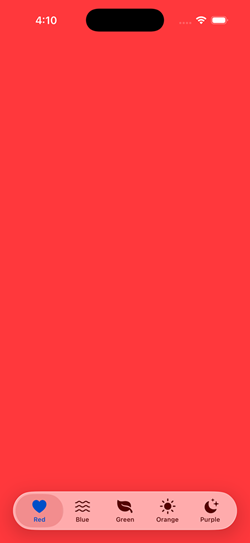
The ask: Five tabs, five full-screen colors, SF Symbol icons, labels.
Qwen nailed it in a single pass in about 40 seconds. Clean, straightforward, no issues. Wrote each tab out explicitly with separate Color, Image, and Text declarations.
Gemma also solved it in one pass in about 26 seconds - faster - but with one incorrect SF Symbol name (water.wave instead of water.waves). A trivial fix, but a fix nonetheless.
The interesting code quality difference: Gemma created a TabConfiguration struct and drove the UI with ForEach, which is the architecturally correct pattern for this specific prompt where all tabs share uniform data. It also used Label() for tab items - the modern SwiftUI idiom - while Qwen used the older separate Image + Text pattern.
Worth noting: in a real production app, tabs call distinct views with different modifiers and navigation stacks. Qwen's explicit style is actually closer to how that code looks in practice. But the prompt asked for uniform color tabs, and Gemma recognized that uniformity and applied the right pattern for it.
Verdict: Tie. Both solved it cleanly in one pass. Gemma had the better architecture for the specific ask; Qwen had the cleaner output with no errors.
Test 2 - Drawing Canvas
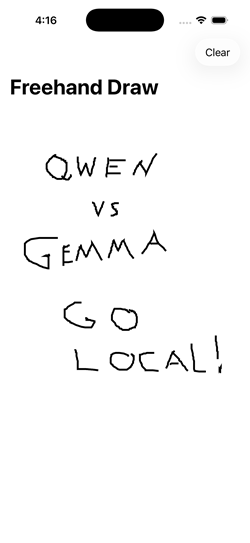
The ask: Freehand drawing with finger, new line on lift/re-touch, Clear button.
Qwen delivered a working solution on the first attempt in about 50 seconds. Clean, readable, functional.
Gemma took three iterations and nearly three minutes of total generation time. The first iteration didn't even write to the file. The third iteration worked but left a complete duplicate implementation and an unused helper method in the file - two full view structs where only one was active.
On code quality, both had specific issues. Qwen used DragGesture() without minimumDistance: 0, meaning very short strokes and single-tap dots won't register - a real functional bug for a drawing app. Gemma got the gesture right but shipped dead code that would confuse any developer reading the file.
Verdict: Tie on quality, Qwen wins on performance. Different failure modes: Qwen has a subtle functional gap, Gemma has a code hygiene problem. Neither is clean enough to clearly win on quality, but Qwen's single-pass delivery is a clear performance advantage.
Test 3 - Async/Await Networking
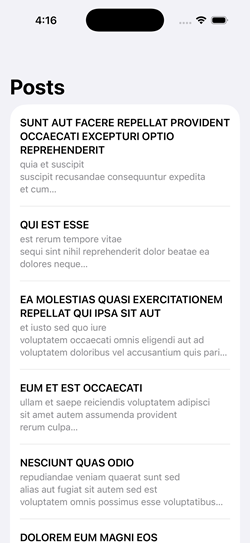
The ask: Fetch posts from a JSON API, display in a List, show loading state, handle errors with retry, use @MainActor correctly.
Both models needed three iterations, though for different reasons. Qwen's third pass was an intentional migration to @Observable rather than a bug fix - so it effectively solved the original prompt in two. Gemma's second iteration described the fixes needed but didn't actually implement them in code, wasting a round trip.
The code quality gap was clear. Qwen's solution had two functional bugs against the spec:
- The
isLoadingcheck on retry replaces the existing post list with a spinner rather than keeping data visible during refresh. - The
catchblock doesn't resetisLoadingto false, so a decode error leaves the spinner up permanently.
Gemma handled both correctly. Its loading check - isLoading && posts.isEmpty - keeps previously loaded data visible during a retry, which is the right UX pattern when the prompt explicitly asks for retry functionality.
Verdict: Gemma wins. Tied on iteration count, but Gemma's code is functionally correct against the retry requirements where Qwen's is not.
Test 4 - Actor + Structured Concurrency
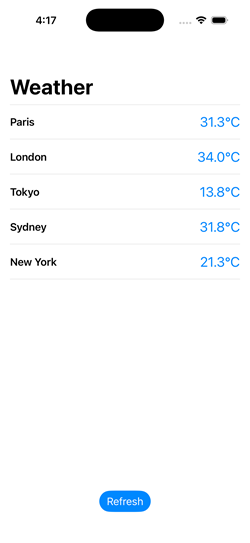
The ask: Simulated concurrent weather fetching for 5 cities, actor-based cache with duplicate prevention, progressive display as results arrive, refresh button.
This was the widest gap of the five tests.
Gemma solved every requirement correctly on the first attempt in about 75 seconds. The actor tracked in-flight tasks by city to prevent duplicates. Results streamed into the UI progressively. @MainActor was placed correctly on the methods that update state.
Qwen needed four iterations and still didn't fully resolve the requirements. The specific failures:
- No duplicate fetch prevention. The actor checked the cache but didn't track in-flight tasks. Two concurrent requests for the same city would both execute.
- Cache didn't persist. A new WeatherCache was instantiated inside
fetchWeather()on every call and immediately cleared - it never actually cached anything across invocations. - @MainActor missing. An inline comment claimed
@Observablehandles main thread dispatch automatically. It doesn't. This is confidently wrong reasoning. - Progressive display broken. The
isLoadingflag wasn't set to false until the entire TaskGroup completed, blocking the list from updating as individual results arrived. Qwen couldn't diagnose this across four attempts - it refactored around the issue rather than identifying the root cause. I eventually identified and fixed the bug manually.
Verdict: Gemma wins decisively. Single iteration, all requirements met. Qwen failed three of four stated requirements and couldn't self-diagnose across four iterations.
Test 5 - SwiftData + @Observable
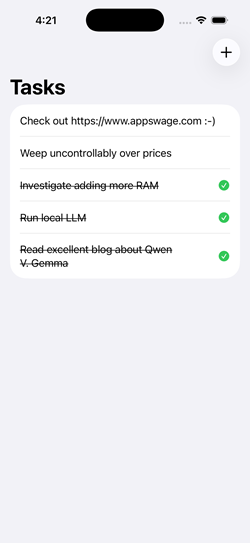
The ask: Task manager app with SwiftData persistence, @Model, @Query sorted by date, @Observable (not ObservableObject), swipe-to-delete, sheet for adding items, tap to complete.
Gemma solved it in one iteration with only a trivial compile error (an extra colon on an image line). The architecture was clean: no unnecessary ViewModel layer, @Query driving the list directly, and a self-contained AddItemView using @Environment for both model context and dismissal.
Qwen needed three iterations. The second produced a visually plausible app where items could be entered but didn't appear in the list - a silent data flow failure harder to diagnose than a compile error. The code had several architectural issues: an unnecessary TodoViewModel layer on top of SwiftData (which is specifically designed so you don't need one for basic CRUD), calling modelContext.insert() on an existing object during a toggle (incorrect - SwiftData tracks mutations automatically), and a sheet architecture that unnecessarily coupled AddItemView to the parent ViewModel.
Both models shared a significant gap: neither added explicit modelContext.save() calls at transaction boundaries. Both relied on SwiftData's autosave, which works during normal app lifecycle transitions but fails when the process terminates unexpectedly - in the simulator's hard stop, but also in production crashes, watchdog kills, or low-memory terminations. This isn't a simulator quirk to dismiss. It's an incomplete understanding of SwiftData's persistence contract that affects real-world reliability. I added explicit saves manually to both solutions.
Verdict: Gemma wins. Stronger SwiftData idiom awareness throughout, cleaner architecture, fewer iterations. The shared autosave gap is a training data limitation common to both model families.
The Numbers
| Test | Qwen 2.6-35B-A3B | Gemma 4-26B-A4B | ||||
|---|---|---|---|---|---|---|
| Iters | Perf | Quality | Iters | Perf | Quality | |
| 1 - Multi-Tab Color | 1 | 5/5 | 4/5 | 1 | 5/5 | 4/5 |
| 2 - Drawing Canvas | 1 | 5/5 | 4/5 | 3 | 2/5 | 4/5 |
| 3 - Async Networking | 3 | 3/5 | 4/5 | 3 | 3/5 | 5/5 |
| 4 - Actor + Concurrency | 4 | 1/5 | 2/5 | 1 | 5/5 | 5/5 |
| 5 - SwiftData + @Observable | 3 | 2/5 | 3/5 | 1 | 4/5 | 4/5 |
| Totals | 16/25 | 17/25 | 19/25 | 22/25 | ||
What I Learned
Gemma excels where it matters most. The two hardest tests - actor-based concurrency and SwiftData - are the ones most representative of production iOS development with modern APIs. Gemma handled both with stronger architectural instincts and fewer iterations.
Qwen is reliable for straightforward tasks. For well-defined prompts with established API patterns, Qwen delivered clean first-pass solutions. It's a solid choice when the code doesn't push into iOS 17+ territory.
Both models have a SwiftData blind spot. The autosave assumption and the missing ModelContainer injection appeared in both models identically. If you're using any local LLM for SwiftData work, treat explicit saves as a mandatory manual addition.
Speed compounds. Gemma was consistently faster in both prompt evaluation and token generation. For iterative workflows, that advantage multiplies - Gemma's single-iteration Test 4 result was faster than any single Qwen iteration on the same test.
Diagnostic ability is a real differentiator. Both models occasionally described fixes without implementing them. More critically, Qwen showed a pattern of refactoring around problems rather than identifying root causes - particularly visible in Test 4, where it couldn't isolate a straightforward state management bug across four attempts.
Watch for behavioral drift. Qwen developed a persistent tendency to create new files rather than editing in place, and this worsened across the session rather than responding to correction. If you're using local LLMs for iterative code editing, monitor for this kind of instruction-following degradation.
Frontier Models. While it's amazing how well local models can work for Swift coding, they are not nearly as preformant as cloud frontier models. However, not every situation or budget calls for that. The expected rise in costs of using those frontier models will continue to make a stronger and stronger case for local LLMs becoming part of the production development mix.
One More Thing: The Context Window Trap
During testing I hit a problem where Qwen would run for a minute or more and then stop - no errors, no output, nothing. The LM Studio server log revealed the culprit:
stop processing: n_tokens = 8191, truncated = 1The model was hitting the 8,192-token context window ceiling and being silently truncated. For code generation tasks, especially Tests 4 and 5 where the prompt plus generated code can easily exceed 6,000 tokens, an 8K context window is not enough. Bumping to 16K or 32K in LM Studio's server settings resolved it - but it requires a server restart, not just a settings change.
If you're benchmarking local models for code generation, start with at least 16K context. 32K is safer.
Setup Disclosure
Model Hosting
- CPU: AMD Ryzen 5 9600X
- GPU: AMD Radeon 9070XT (16GB VRAM)
- RAM: 32GB DDR5
- Software: LM Studio 0.4.12
- OS: Windows 11 Pro (25H2)
- Context: 32,768
- Temperature: 0.2
- KV Cache: Offloaded to memory
- Number of Experts: 8
Development Environment
- Hardware: Mac Mini M1 (8GB)
- IDE: Xcode 26
- Integration: Xcode MCP integration to LM Studio (no web search or RAG capability)
System Prompt
Both models received the same system prompt for all tests:
You are a helpful coding assistant specializing in Swift, SwiftUI, Kotlin, and JavaScript. When asked about recent updates, current APIs, latest versions, or anything that may have changed recently, always use the web search tool to find current information before answering. Keep code responses precise and accurate. Solution should be concise and the simplest required to fulfill the need.
Note: The system prompt references a web search tool, but the Xcode MCP integration does not provide web search capability. The models had no access to external information during testing. All output came from the model weights alone.
LLM Infrastructure (Not Used in This Report)
The following components are part of my local LLM setup but were not used during this benchmark:
- Synology DS220+ with Docker - hosts additional services
- Open-WebUI - provides RAG and web access capabilities
- searXNG - provides search capabilities for LLM workflows
These components extend the local LLM environment with retrieval-augmented generation and live web search, but they are not accessible currently from Xcode's built-in AI assistant.